 Excellent PLC


Overview
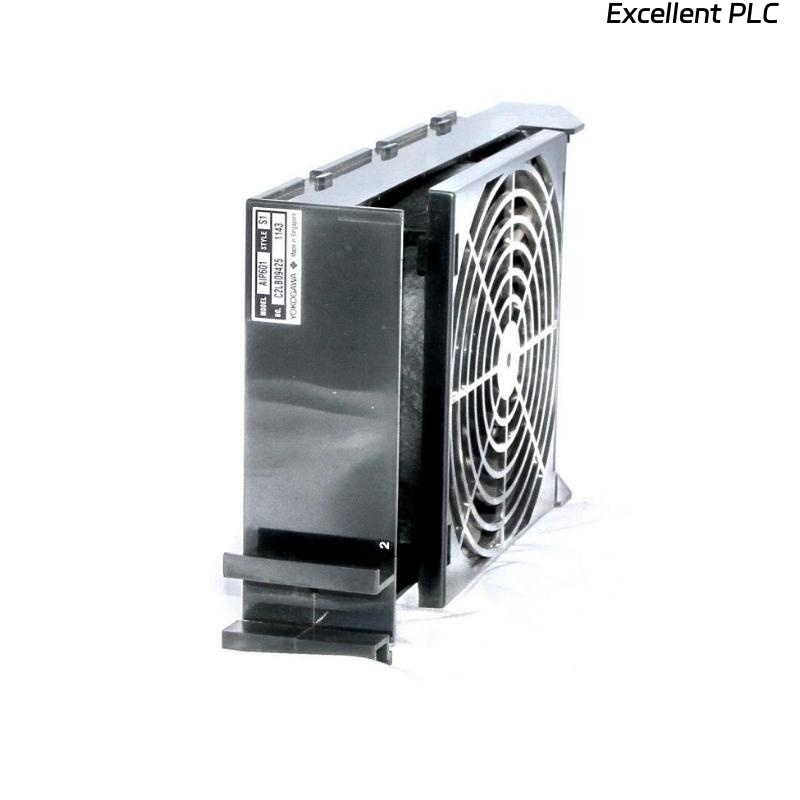
The Yokogawa AIP602 Fan Unit is a cooling module designed for the CENTUM CS3000, VP, or STARDOM control systems.
Its main role is to maintain the operating temperature of controller and I/O modules within safe limits.
A common issue encountered in field operation is that the fans appear to be spinning normally, yet the system still issues a “High Temperature” or “Cooling Failure” alarm.
This condition usually indicates a sensor or airflow issue, not necessarily a fan motor problem.
🔍 1. Understanding the Problem
Even when the fans rotate, several hidden conditions can trigger a false or real over-temperature alarm:
| Possible Cause | Description |
|---|---|
| Temperature sensor fault | The thermistor or RTD inside the unit gives an incorrect reading. |
| Reduced airflow | Dust buildup or blocked vents prevent proper heat dissipation. |
| Fan speed below threshold | The fan spins but not at rated RPM, causing insufficient cooling. |
| Signal feedback issue | The control board does not receive correct fan-tachometer feedback. |
| Ambient temperature too high | External heat load exceeds cooling capacity. |
⚠️ 2. Safety Notes
Before inspection or repair:
-
Turn off system power and wait for internal fans to stop.
-
Avoid touching internal circuits with power applied.
-
Use ESD protection when handling boards or sensors.
-
Record temperature readings and alarm times for analysis.
🧰 3. Step-by-Step Troubleshooting
Step 1 — Verify Actual Temperature
-
Use an infrared thermometer to measure cabinet temperature near the AIP602.
-
If the ambient temperature is normal (below 45 °C), the alarm is likely false or sensor-related.
-
If temperature is genuinely high, proceed to check airflow.
Step 2 — Airflow and Obstruction Check
-
Remove the AIP602 module and inspect air inlet/outlet vents.
-
Clean any dust or debris from the filters and fan blades.
-
Ensure the airflow direction matches the installation guide (front-to-back or bottom-to-top).
-
Confirm no cables or equipment are blocking air circulation.
🧩 Field tip: Even light dust on the intake grill can reduce effective cooling by up to 30%, triggering over-temperature alarms.
Step 3 — Fan Speed and Signal Feedback
-
Listen closely — abnormal fan noise or unstable RPM indicates bearing wear.
-
Measure fan rotation speed using a tachometer if available.
-
Verify the tach feedback signal to the controller (usually open-collector or pulse type).
-
A broken tach line may cause “fan running but alarm active” condition.
If RPM is below specification, replace the fan module.
Step 4 — Temperature Sensor and Control Board
-
The AIP602 includes an onboard temperature sensor (NTC thermistor or RTD).
-
Check the sensor wiring and connector for looseness or oxidation.
-
Measure resistance at room temperature and compare with reference values.
-
If the sensor reads out of range, replace the sensor or control board assembly.
Typical reading example (for NTC type):
| Temperature | Expected Resistance |
|---|---|
| 25 °C | ~10 kΩ |
| 50 °C | ~3.3 kΩ |
Step 5 — System Communication Check
Sometimes, the fan control module communicates temperature data to the main CPU or power module via a backplane or signal cable.
If this link is unstable or disconnected, the CPU interprets missing data as “high temperature”.
-
Reseat connectors on the backplane.
-
Check for bent pins or burnt contacts.
-
Perform module self-test or reinitialization after reconnection.
Step 6 — Replacement Test
If all mechanical and electrical checks are normal but the alarm persists:
-
Replace the AIP602 with a verified good spare unit.
-
Power on and monitor temperature readings for at least 30 minutes.
-
If the alarm disappears → faulty sensor or internal PCB on the old unit.
-
If the alarm remains → trace to the system controller input or power distribution board.
🧾 Maintenance Advice
-
Clean air filters every 3–6 months.
-
Keep cabinet ambient temperature below 40 °C.
-
Periodically check fan RPM feedback during preventive maintenance.
-
Replace fans showing noise, vibration, or slow startup.
-
Ensure proper cabinet ventilation and spacing between units.
🧠 Engineering Insight
From long-term field data, over 65% of “fan running but high temperature” cases in AIP602 units were due to sensor or feedback circuit faults, not cooling failure.
Routine inspection of connectors and airways can prevent most false alarms.
🧩 Summary
When the Yokogawa AIP602 fan unit spins but still reports “High Temperature,” don’t immediately assume fan failure.
Perform a structured check of airflow, sensor signal, tach feedback, and communication lines.
A systematic approach ensures accurate fault isolation and prevents unnecessary replacements.