 Excellent PLC


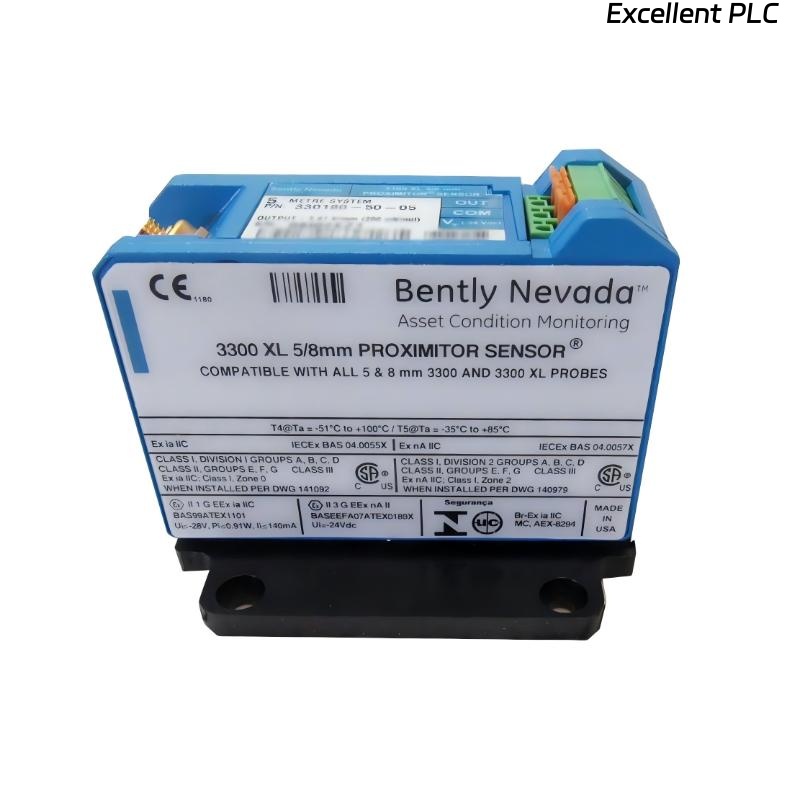
Installing a Bently Nevada 330180-X0-05 proximity probe with a 145004-04 proximity module requires careful attention to detail. These components are essential for precise turbine shaft position and vibration monitoring, and improper installation can result in false readings, trip alarms, or even equipment damage. Here’s a detailed field guide based on hands-on experience.
Step 1: Pre-Installation Preparation
-
Power down the turbine and the 3500 monitoring system before starting.
-
Confirm part numbers: 330180-X0-05 (probe) and 145004-04 (module).
-
Gather tools: torque screwdriver, multimeter, dial indicator, ESD wrist strap, cleaning cloths, and wire labels.
-
Inspect the probe and module for physical damage, moisture ingress, or bent connectors.
Field tip: ESD protection is crucial when handling sensitive module electronics.
Step 2: Probe Mounting
-
Identify the correct probe mounting location near the turbine shaft.
-
Clean the mounting surface to remove oil, dust, or debris.
-
Install the probe in its housing using OEM-specified fasteners.
-
Maintain the recommended air gap between the probe tip and shaft (typically 0.25–1 mm depending on specification).
-
Align the probe perpendicular to the shaft surface to ensure accurate readings.
Insight: Even a slight tilt or incorrect air gap can significantly affect signal quality.
Step 3: Cable Routing
-
Route the probe cable away from high vibration, heat, and moisture sources.
-
Avoid sharp bends or pinched sections.
-
Use strain relief at both ends to prevent mechanical stress on the probe or module.
-
Ensure the shield is continuous and properly grounded at the module end.
Step 4: Module Installation
-
Identify the correct slot in the 3500 rack for the 145004-04 module.
-
Slide the module into the DIN rail guides carefully.
-
Lock the module firmly — it should click into place.
-
Check that all front LEDs are off before powering the rack.
Field tip: Incorrect module placement can lead to channel misassignment.
Step 5: Wiring Connections
| Terminal | Function | Notes |
|---|---|---|
| +V | Power supply (24 VDC) | Observe correct polarity |
| COM | Ground / Return | Connect to system common |
| SIGNAL | Probe input | Connect to 330180-X0-05 probe cable |
| SHIELD / PE | Protective ground | Maintain continuity with probe shield |
Steps:
-
Strip wires carefully (~8–10 mm).
-
Connect probe signal to module SIGNAL input.
-
Connect power and return with correct polarity.
-
Connect shield to module PE terminal.
-
Tighten screws to recommended torque (~0.4–0.5 Nm).
Field tip: Loose shield or miswiring often causes signal noise or intermittent faults.
Step 6: Power-Up and Verification
-
Apply power to the 3500 rack.
-
Check LED indicators:
-
Green: module powered
-
Yellow: input warnings
-
Red: module fault
-
-
Use monitoring software to verify stable readings from the probe.
-
Rotate the shaft slowly to confirm smooth signal variation.
Step 7: Calibration
-
Adjust air gap using a dial indicator if necessary.
-
Ensure that the probe output is within expected range at baseline.
-
Capture baseline readings for future diagnostics.
Field insight: Accurate air gap and alignment ensure long-term stability of vibration and position monitoring.
Step 8: Common Field Mistakes
-
Incorrect air gap or tilt of the probe.
-
Loose shield or connector wiring.
-
Routing cables near high-power lines or vibration sources.
-
Skipping calibration and baseline verification.
Step 9: Best Practices
-
Document module and probe serial numbers, location, and channel assignments.
-
Label all wiring for maintenance purposes.
-
Perform initial functional testing and baseline capture before leaving the site.
-
Use protective conduits in areas prone to moisture or mechanical stress.
Key Takeaways
-
The 330180-X0-05 probe and 145004-04 module are precise instruments — installation quality directly impacts system reliability.
-
Stepwise attention to mounting, wiring, grounding, and calibration prevents false alarms and ensures accurate turbine monitoring.
“In proximity monitoring, the smallest detail — a fraction of a millimeter in air gap or a loose shield — can determine whether your system performs flawlessly or causes headaches.”