 Excellent PLC


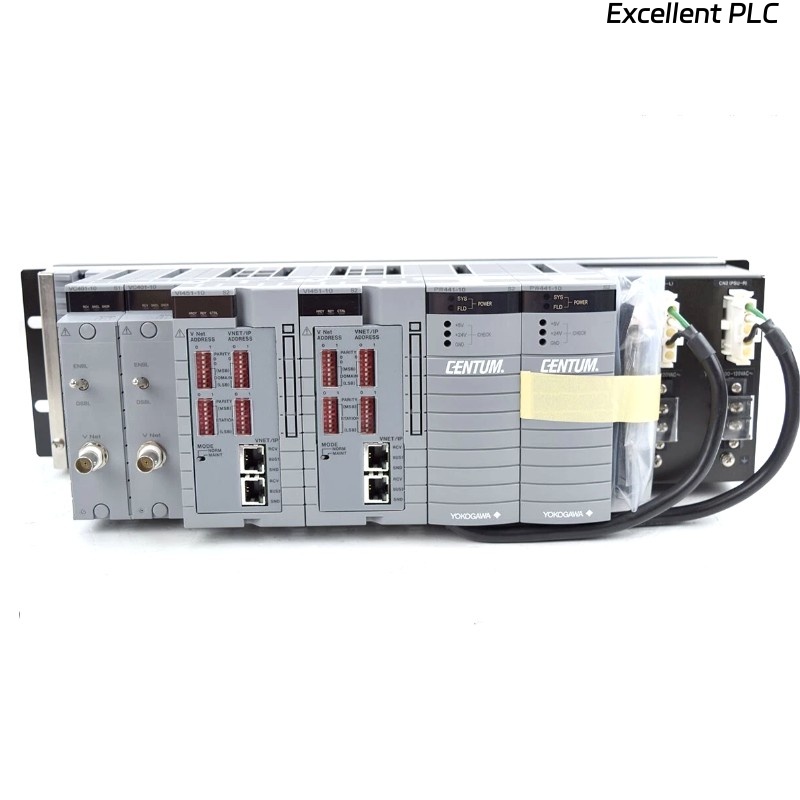
The Yokogawa AVR10D Duplexed V net Router is a redundant industrial communication router designed for Yokogawa CENTUM VP and CENTUM CS 3000 Distributed Control Systems (DCS). It connects legacy V net or VL net control networks with modern Vnet/IP domains, enabling bidirectional communication between Human Interface Stations (HIS), Field Control Stations (FCS), Engineering Stations (ENG), and other control devices. The AVR10D features redundant communication modules and redundant power supplies to maximize system availability in mission-critical industrial applications.
Contents
- 1. Product Overview
- 2. Main Features
- 3. Typical Applications
- 4. Installation Preparation
- 5. Router Installation
- 6. Network Connections
- 7. Router Configuration
- 8. Commissioning Procedure
- 9. Preventive Maintenance
- 10. Practical Installation Case
- 11. Frequently Asked Questions
Product Overview
The AVR10D serves as a communication bridge between Vnet/IP and legacy V net or VL net domains. It relays control data in both directions, allowing operators and engineering stations on one network to monitor and control equipment located on the other network. The router supports redundant communication modules and redundant power supplies to ensure continuous operation during hardware failures.
Main Features
- Dual-redundant communication modules
- Dual-redundant power supply modules
- Supports Vnet/IP and V net/VL net integration
- Bidirectional control communication
- High system availability
- Supports redundant industrial networks
- Rack-mounted industrial design
- Compatible with CENTUM VP and CENTUM CS 3000
Typical Applications
- CENTUM VP migration projects
- Legacy V net integration
- Control network expansion
- DCS modernization
- Industrial Ethernet communication
- Refinery automation systems
- Power plant control networks
- Petrochemical process control
Installation Preparation
- Verify the AVR10D model and suffix code.
- Confirm network architecture.
- Prepare Ethernet and V net/VL net cables.
- Verify cabinet grounding.
- Install the router in a metallic control cabinet.
- Disconnect cabinet power.
- Review the system network drawings.
Router Installation
- Turn off cabinet power.
- Mount the AVR10D into the 19-inch rack.
- Secure all mounting screws.
- Connect redundant power supplies.
- Connect Vnet/IP Ethernet interfaces.
- Connect V net or VL net interfaces.
- Verify all connectors before energizing the system.
Network Connections
- Connect RJ45 Ethernet ports to the Vnet/IP switches.
- Connect the V net or VL net interface using the specified communication cable.
- Verify redundant network paths.
- Inspect connector locking.
- Separate communication cables from power cables.
- Label all network connections.
Router Configuration
- Configure network domain parameters.
- Assign router identification.
- Configure communication redundancy.
- Download engineering configuration.
- Verify network routing.
- Confirm communication diagnostics.
Commissioning Procedure
VERIFY HARDWARE INSTALLATION
CHECK POWER MODULES
VERIFY NETWORK CONNECTIONS
POWER UP ROUTER
CONFIGURE NETWORK PARAMETERS
VERIFY COMMUNICATION
TEST REDUNDANT OPERATION
CONFIRM NORMAL SYSTEM STATUS
Preventive Maintenance
- Inspect communication cables regularly.
- Verify redundant power supplies.
- Check cooling airflow.
- Inspect connector condition.
- Review communication diagnostics.
- Verify redundant network status.
Practical Installation Case
A refinery upgraded its control system from CENTUM CS 3000 to CENTUM VP while retaining several legacy V net controllers. Engineers installed an AVR10D router between the Vnet/IP backbone and the existing V net domain. After configuring routing parameters and verifying redundant communication paths, operators successfully monitored and controlled both legacy and new controllers from a unified operator station without interrupting plant production.
Frequently Asked Questions
What is the purpose of the AVR10D?
The AVR10D connects Vnet/IP networks with legacy V net or VL net domains, allowing bidirectional communication between Yokogawa control systems.
Does the AVR10D support redundancy?
Yes. The router includes redundant communication modules and redundant power supply modules for high system availability.
Can the AVR10D be used during system migration?
Yes. It is commonly deployed when migrating from legacy V net systems to Vnet/IP, allowing both network domains to operate simultaneously during phased upgrades.
Summary
The Yokogawa AVR10D Duplexed V net Router provides reliable, redundant communication between legacy V net/VL net systems and modern Vnet/IP networks. Proper installation, network configuration, and redundancy verification ensure stable communication and high availability for Yokogawa CENTUM Distributed Control Systems.