 Excellent PLC


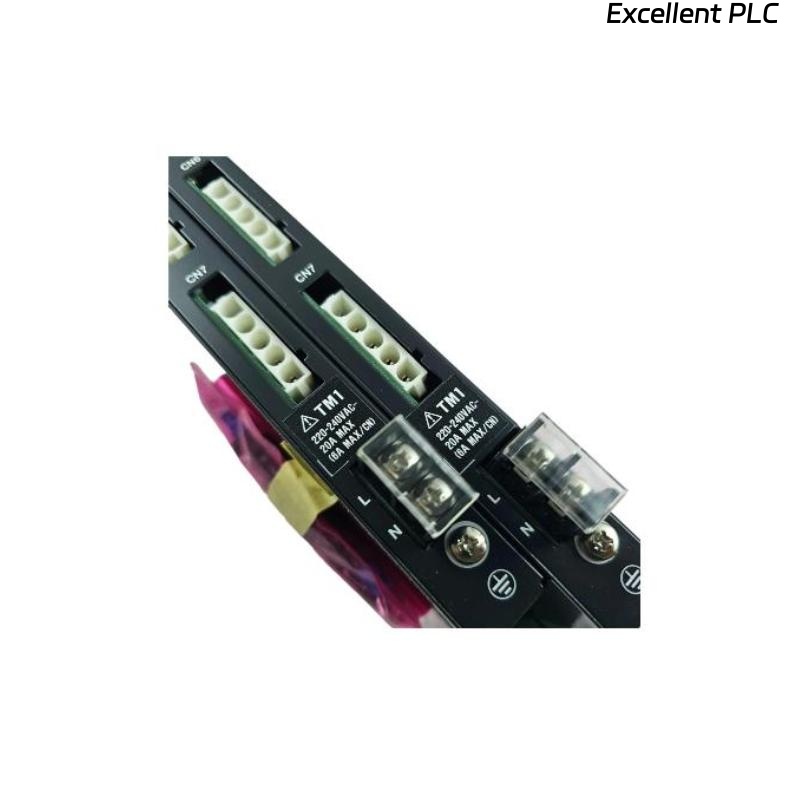
The Yokogawa AFE10D Duplexed Field Control Unit (FCU) is designed to provide highly available process control through redundant processors, redundant communication paths, and redundant power architecture. Although the system is engineered for continuous operation, faults can occur because of hardware failures, communication problems, synchronization issues, power disturbances, configuration mismatches, or environmental factors. A structured troubleshooting methodology helps maintenance engineers identify the root cause quickly, restore redundancy, and minimize process interruptions.
Contents
- 1. Understanding AFE10D Fault Conditions
- 2. Common Failure Symptoms
- 3. Typical Causes of Controller Problems
- 4. Visual Inspection Procedure
- 5. Power System Verification
- 6. Redundancy Status Inspection
- 7. Communication Network Diagnostics
- 8. I/O Communication Verification
- 9. Controller Diagnostic Analysis
- 10. Recommended Troubleshooting Workflow
- 11. Corrective Actions
- 12. Functional Recovery Verification
- 13. Preventive Maintenance
- 14. Environmental Considerations
- 15. Real Industrial Maintenance Case
- 16. Frequently Asked Questions
Understanding AFE10D Fault Conditions
The AFE10D operates as a redundant controller pair consisting of active and standby control processors. Under normal conditions, both processors remain synchronized while continuously exchanging status and process information.
Faults typically affect controller synchronization, network communication, power availability, I/O connectivity, or controller hardware health. Many issues can be resolved without replacing the FCU by identifying wiring, configuration, or communication problems.
Common Failure Symptoms
- Standby controller unavailable
- Redundancy lost alarm
- Controller synchronization failure
- I/O communication errors
- Controller restart events
- Network communication interruptions
- Process control degradation
- Controller hardware alarms
Typical Causes of Controller Problems
- Power supply instability
- Communication cable faults
- Redundant network failure
- Controller hardware malfunction
- Configuration inconsistencies
- Synchronization errors
- I/O subsystem communication faults
- Excessive cabinet temperature
Visual Inspection Procedure
- Inspect controller modules
- Verify status indicators
- Check communication cables
- Inspect power supply modules
- Verify rack mounting security
Power System Verification
Power integrity is essential for maintaining controller redundancy.
- Verify input voltage
- Check redundant power supplies
- Inspect protective devices
- Measure output voltages
- Review power alarm history
Redundancy Status Inspection
- Verify active controller status
- Verify standby controller status
- Check synchronization indicators
- Review redundancy alarms
- Confirm automatic switchover capability
Communication Network Diagnostics
- Inspect network connectors
- Verify redundant network paths
- Check communication statistics
- Review network error logs
- Verify cable integrity
I/O Communication Verification
- Confirm I/O node availability
- Inspect I/O communication links
- Review I/O diagnostic alarms
- Verify field network operation
- Monitor communication stability
Controller Diagnostic Analysis
| Observed Condition | Possible Diagnosis |
|---|---|
| Standby unavailable | Synchronization or communication fault |
| Controller restart alarm | Power disturbance or hardware issue |
| I/O communication loss | Network or interface fault |
| Redundancy alarm | Controller mismatch or standby failure |
| Communication timeout | Network interruption or cable fault |
Diagnostic records should always be reviewed before performing hardware replacement.
Recommended Troubleshooting Workflow
VERIFY POWER SUPPLIES
CHECK CONTROLLER STATUS
VERIFY REDUNDANCY
INSPECT NETWORK CONNECTIONS
CHECK I/O COMMUNICATION
REVIEW DIAGNOSTIC LOGS
IDENTIFY ROOT CAUSE
IMPLEMENT CORRECTION
VERIFY SYSTEM RECOVERY
A structured troubleshooting sequence reduces downtime and helps preserve controller availability.
Corrective Actions
- Restore redundant power feeds
- Replace damaged communication cables
- Correct configuration mismatches
- Resynchronize controller modules
- Repair network connections
- Replace faulty hardware modules if necessary
- Update controller firmware according to approved procedures
Functional Recovery Verification
- Verify active and standby operation
- Confirm synchronization status
- Test automatic controller switchover
- Verify I/O communications
- Monitor diagnostics during operation
Preventive Maintenance
- Inspect controller diagnostics regularly
- Verify redundancy operation periodically
- Inspect communication cables
- Maintain system backups
- Review alarm history routinely
Environmental Considerations
Environmental conditions significantly influence controller reliability.
- Maintain cabinet cooling
- Prevent excessive humidity
- Reduce vibration exposure
- Protect against dust contamination
- Maintain stable operating temperatures
Real Industrial Maintenance Case
At a petrochemical complex, operators reported a persistent redundancy alarm on an AFE10D Field Control Unit. The active controller continued operating normally, but the standby controller remained unavailable.
Diagnostic analysis showed repeated synchronization failures. Engineers verified controller hardware and discovered that a redundant communication cable connecting the standby controller had been damaged during cabinet maintenance work.
After replacing the cable and restarting synchronization:
- Controller synchronization completed successfully.
- Redundant operation was restored.
- Automatic switchover testing passed.
- No controller hardware replacement was required.
This case demonstrates that communication infrastructure issues frequently cause redundancy alarms and should be investigated before replacing controller modules.
Frequently Asked Questions
What causes a standby controller to become unavailable?
Common causes include synchronization failures, communication network problems, controller hardware issues, configuration mismatches, or power supply disturbances.
Can the process continue operating if redundancy is lost?
In most cases, the active controller continues controlling the process. However, redundancy protection is unavailable until the fault is corrected.
When should an AFE10D controller module be replaced?
Replacement should be considered only after power, communication, configuration, synchronization, and environmental issues have been eliminated as possible causes of the fault.
Summary
Effective troubleshooting of the Yokogawa AFE10D Duplexed Field Control Unit requires verification of power integrity, controller synchronization, redundant communication networks, I/O connectivity, and diagnostic records. Following a structured troubleshooting methodology helps restore redundancy, maintain process continuity, and avoid unnecessary hardware replacement while maximizing control system availability.