 Excellent PLC


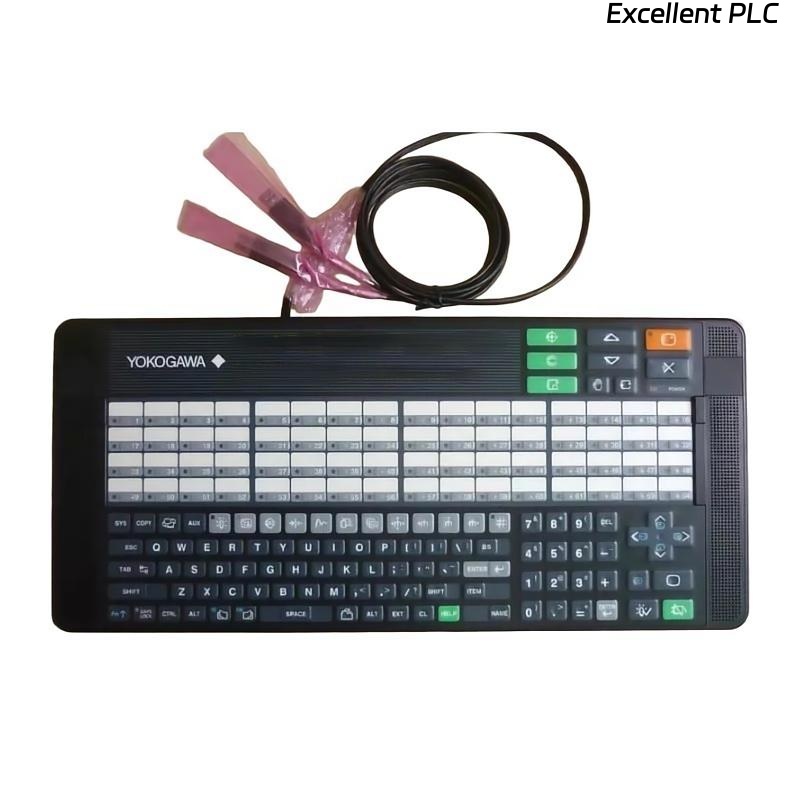
The Yokogawa AIP831 Operation Keyboard is a dedicated industrial operator keyboard designed for eight-loop simultaneous operation on Yokogawa CENTUM VP Desktop Human Interface Stations (HIS). Unlike conventional operation keyboards, the AIP831 allows operators to control and monitor up to eight control loops simultaneously through dedicated loop control keys equipped with touch sensors. It also incorporates an independent USB speaker for alarm notification and supports the Instrument Faceplate Highlight function. The keyboard connects to the HIS using two USB interfaces and requires the Eight-loop Simultaneous Operation software package (VP6H1140/LHS1140) in addition to the standard operation and monitoring software.
Contents
- 1. Product Overview
- 2. Main Features
- 3. Typical Applications
- 4. Installation Preparation
- 5. Hardware Inspection
- 6. Keyboard Installation
- 7. USB Connection
- 8. Software Configuration
- 9. Commissioning Procedure
- 10. Functional Verification
- 11. Preventive Maintenance
- 12. Practical Installation Case
- 13. Frequently Asked Questions
Product Overview
The AIP831 is designed specifically for CENTUM VP desktop Human Interface Stations that require simultaneous operation of multiple control loops. It provides eight dedicated loop control sections with touch-sensitive keys for fast instrument selection and operator interaction. An integrated USB speaker provides alarm sounds independently from the workstation audio system. Only one AIP831 may be connected to each desktop HIS.
Main Features
- Eight-loop simultaneous operation capability
- Dedicated loop control keys
- Touch sensors for Instrument Faceplate Highlight
- Integrated USB speaker and buzzer
- Dual USB interface
- Flat industrial keyboard design
- USB bus-powered operation
- Optimized for continuous 24-hour control room operation
Typical Applications
- CENTUM VP Desktop Human Interface Stations
- Multi-loop operator workstations
- Central control rooms
- Oil and gas facilities
- Petrochemical plants
- Power generation stations
- Chemical processing plants
- Large-scale industrial automation systems
Installation Preparation
- Verify the HIS is running a supported CENTUM VP release.
- Install the required Eight-loop Simultaneous Operation software package.
- Ensure two available USB ports on the workstation.
- Prepare an ESD-safe work environment.
- Inspect the keyboard before installation.
Hardware Inspection
- Verify the AIP831 model number.
- Inspect the keyboard enclosure.
- Check all loop control keys.
- Inspect both USB cables.
- Verify the touch sensor area is clean.
Keyboard Installation
- Place the keyboard on the operator console.
- Connect both USB connectors directly to the HIS.
- Secure cable routing to prevent strain.
- Power on the workstation.
- Allow the operating system to detect both USB devices.
- Launch the CENTUM VP Human Interface Station.
USB Connection
- Connect both USB cables directly to the computer.
- Do not use passive USB splitters.
- Verify keyboard and speaker functions are detected.
- Inspect connectors for secure engagement.
- Confirm stable USB power.
Software Configuration
- Verify Standard Operation and Monitoring Function is installed.
- Verify VP6H1140 or LHS1140 software package is licensed.
- Confirm eight-loop operation is enabled.
- Verify touch sensor functionality.
- Test speaker operation.
Commissioning Procedure
CONNECT BOTH USB CABLES
START THE WORKSTATION
VERIFY DEVICE DETECTION
LOAD CENTUM VP HIS
VERIFY EIGHT-LOOP OPERATION
TEST TOUCH SENSORS
TEST SPEAKER
VERIFY ALARM FUNCTIONS
PLACE SYSTEM INTO OPERATION
Functional Verification
- Verify all eight loop control sections operate correctly.
- Test touch sensor response.
- Confirm Instrument Faceplate Highlight.
- Verify USB speaker output.
- Test alarm acknowledgement and navigation keys.
Preventive Maintenance
- Clean the keyboard surface regularly.
- Inspect USB cables for wear.
- Keep touch sensor areas free from contamination.
- Verify speaker functionality during maintenance.
- Inspect connectors for oxidation or damage.
Practical Installation Case
During the expansion of a refinery control room, operators required simultaneous monitoring of multiple process loops from a single workstation.
After installing an AIP831 keyboard and enabling the Eight-loop Simultaneous Operation software package:
- Operators monitored eight control loops simultaneously.
- Instrument faceplate selection became significantly faster.
- Alarm response time improved.
- Overall operator workload was reduced during abnormal operating conditions.
Frequently Asked Questions
What makes the AIP831 different from the AIP830?
The AIP831 supports simultaneous operation of up to eight control loops and includes touch-sensitive loop control keys, while the AIP830 is intended for single-loop operation.
How many USB connections are required?
The AIP831 requires two USB connections—one for keyboard operation and one for the integrated USB speaker. Both connectors must remain connected directly to the Human Interface Station.
Is additional software required?
Yes. In addition to the standard CENTUM VP Operation and Monitoring Function, the Eight-loop Simultaneous Operation software package (VP6H1140 or LHS1140, depending on the software release) is required.
Summary
Proper installation of the Yokogawa AIP831 Operation Keyboard enables efficient eight-loop simultaneous operation on CENTUM VP Human Interface Stations. Correct USB connection, software licensing, touch sensor verification, and routine preventive maintenance ensure reliable multi-loop control, rapid alarm response, and dependable long-term operation in industrial process control environments.