 Excellent PLC


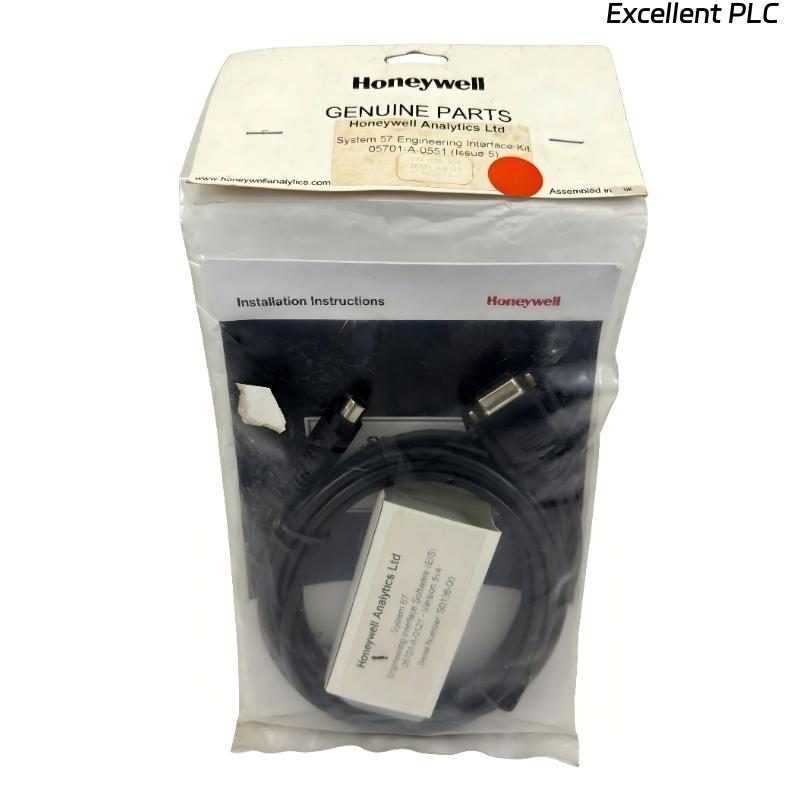
The Honeywell 05701-A-0121 Engineering Interface Software is the configuration and diagnostic application developed for the Honeywell System 57 Gas Detection Controller. Used together with the 05701-A-0551 Engineering Interface Kit and the 05701-A-0120 Engineering Interface Lead, the software enables engineers to configure controller parameters, upload and download system configurations, perform diagnostics, monitor operating status, and maintain System 57 installations from a personal computer. It is an essential commissioning and maintenance tool for System 57 gas detection systems.
Contents
- 1. Product Overview
- 2. Main Features
- 3. Typical Applications
- 4. Installation Preparation
- 5. Software Installation
- 6. Engineering Interface Connection
- 7. System Configuration
- 8. Commissioning Procedure
- 9. Functional Verification
- 10. Preventive Maintenance
- 11. Practical Installation Case
- 12. Frequently Asked Questions
Product Overview
The 05701-A-0121 software provides an intuitive engineering environment for configuring and maintaining Honeywell System 57 controllers. Through the Engineering Card, users can adjust detector parameters, relay logic, alarm thresholds, communication settings, calibration values, and system options while creating complete configuration backups for future maintenance.
Main Features
- Complete System 57 configuration software
- Supports Engineering Interface Kit communication
- Upload and download controller configurations
- Real-time controller diagnostics
- Alarm parameter configuration
- Relay configuration and monitoring
- Configuration backup and restoration
- Compatible with Honeywell System 57 Engineering Card
Typical Applications
- Gas detection system commissioning
- System configuration
- Industrial preventive maintenance
- Controller diagnostics
- Alarm optimization
- Plant shutdown maintenance
- System upgrades
- Configuration backup management
Installation Preparation
- Verify the software version.
- Install the 05701-A-0551 Engineering Interface Kit.
- Connect the 05701-A-0120 Engineering Interface Lead.
- Confirm the Engineering Card is installed.
- Prepare the engineering computer.
- Verify communication port settings.
- Create a backup of the current configuration.
Software Installation
- Install the 05701-A-0121 Engineering Interface Software.
- Restart the engineering computer if required.
- Launch the engineering application.
- Select the correct communication port.
- Connect to the System 57 controller.
- Read the existing controller configuration.
- Save the configuration before making changes.
Engineering Interface Connection
- Connect the Engineering Interface Lead.
- Verify communication with the Engineering Card.
- Confirm controller identification.
- Read configuration parameters.
- Back up the controller database.
- Verify stable communication.
System Configuration
- Configure gas detector parameters.
- Adjust alarm thresholds.
- Configure relay outputs.
- Modify communication settings.
- Download updated parameters.
- Verify controller operation.
Commissioning Procedure
INSTALL SOFTWARE
CONNECT ENGINEERING INTERFACE
ESTABLISH COMMUNICATION
UPLOAD EXISTING CONFIGURATION
SAVE BACKUP
MODIFY PARAMETERS
DOWNLOAD CONFIGURATION
VERIFY SYSTEM OPERATION
Functional Verification
- Verify successful communication.
- Confirm configuration upload.
- Confirm configuration download.
- Verify alarm operation.
- Check relay functions.
- Review diagnostic information.
Preventive Maintenance
- Maintain backup copies of configurations.
- Document all parameter changes.
- Verify communication before maintenance.
- Update engineering records.
- Inspect interface cables regularly.
- Protect configuration files from unauthorized modification.
Practical Installation Case
During the commissioning of a refinery gas detection system, engineers installed the Honeywell 05701-A-0121 Engineering Interface Software on a maintenance laptop and connected it to the System 57 controller using the Engineering Interface Kit. After uploading the factory configuration, alarm thresholds, detector assignments, relay logic, and communication parameters were customized for the project. The revised configuration was downloaded successfully, and all gas detection channels completed functional testing without errors.
Frequently Asked Questions
What is the Honeywell 05701-A-0121?
It is the Engineering Interface Software used to configure, diagnose, and maintain Honeywell System 57 gas detection controllers when used together with the Engineering Interface Kit.
Which hardware is required?
The software is designed to operate with the Honeywell 05701-A-0551 Engineering Interface Kit, the 05701-A-0120 Engineering Interface Lead, and a System 57 Engineering Card.
Should the existing configuration be backed up before modifications?
Yes. Always upload and save the current controller configuration before changing parameters to ensure that the original settings can be restored if necessary.
Summary
The Honeywell 05701-A-0121 Engineering Interface Software provides comprehensive configuration, diagnostics, and maintenance capabilities for Honeywell System 57 gas detection controllers. Proper installation, communication setup, parameter backup, and verification ensure efficient commissioning and reliable long-term operation.