 Excellent PLC


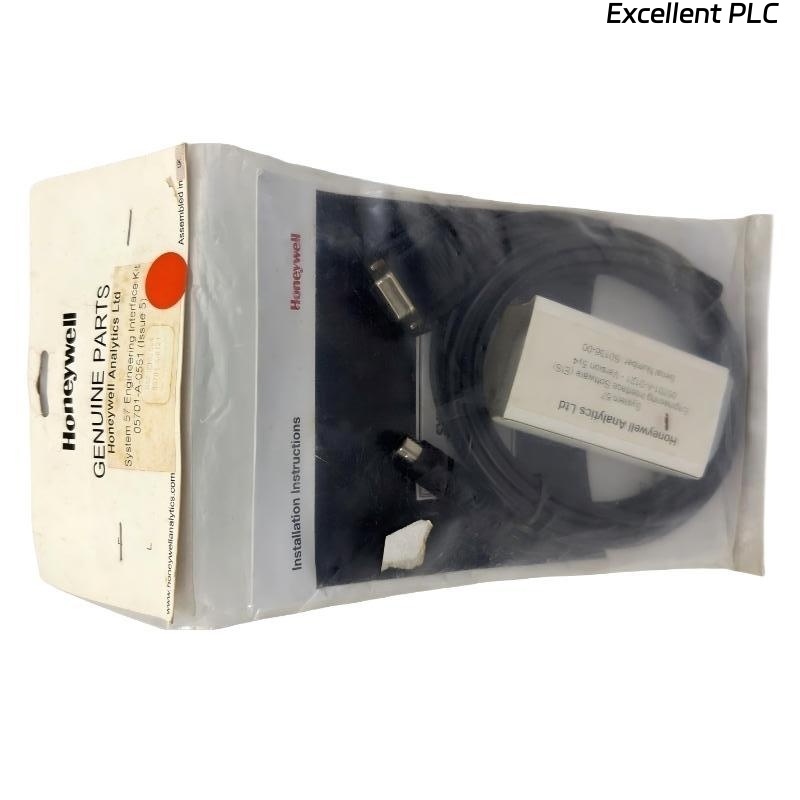
The Honeywell 05701-A-0551 Engineering Interface Kit is a maintenance accessory for the Honeywell System 57 Gas Detection Controller. The kit provides the communication interface required to connect a personal computer to the Engineering Card, allowing engineers to configure controllers, upload and download parameters, monitor system status, perform diagnostics, and maintain gas detection systems efficiently. It is intended for commissioning, routine maintenance, troubleshooting, and system upgrades.
Contents
- 1. Product Overview
- 2. Main Features
- 3. Typical Applications
- 4. Installation Preparation
- 5. Engineering Interface Installation
- 6. PC Connection
- 7. Software Configuration
- 8. Commissioning Procedure
- 9. Functional Verification
- 10. Preventive Maintenance
- 11. Practical Installation Case
- 12. Frequently Asked Questions
Product Overview
The 05701-A-0551 Engineering Interface Kit enables communication between a maintenance computer and the Engineering Card installed in the System 57 rack. Using the engineering software, technicians can configure alarm parameters, detector types, relay functions, calibration settings, communication options, and system diagnostics without removing controller modules.
Main Features
- Direct communication with the Engineering Card
- Supports system configuration and commissioning
- Upload and download configuration data
- Monitor controller status in real time
- Read diagnostic and fault information
- Simplifies preventive maintenance
- Supports parameter backup and restoration
- Compatible with Honeywell System 57 controllers
Typical Applications
- Oil and gas facilities
- Petrochemical plants
- Chemical processing plants
- Offshore platforms
- Power generation stations
- Gas detection commissioning
- Preventive maintenance
- System upgrades
Installation Preparation
- Verify the Engineering Interface Kit part number.
- Confirm the Engineering Card is installed.
- Prepare the engineering software.
- Inspect the interface cable.
- Verify the PC communication port.
- Wear ESD protection equipment.
- Review the controller configuration requirements.
Engineering Interface Installation
- Power the System 57 controller.
- Locate the Engineering Card communication port.
- Connect the Engineering Interface Kit cable.
- Connect the opposite end to the engineering computer.
- Launch the engineering software.
- Establish communication with the controller.
- Verify successful connection before making configuration changes.
PC Connection
- Connect the engineering interface cable securely.
- Select the correct communication port.
- Verify communication settings.
- Read the controller configuration.
- Create a configuration backup.
- Confirm communication stability.
Software Configuration
- Configure gas detector parameters.
- Set alarm thresholds.
- Configure relay outputs.
- Verify communication settings.
- Save configuration changes.
- Restart the controller if required.
Commissioning Procedure
CONNECT ENGINEERING INTERFACE
ESTABLISH PC COMMUNICATION
READ CURRENT CONFIGURATION
BACK UP PARAMETERS
MODIFY REQUIRED SETTINGS
DOWNLOAD CONFIGURATION
VERIFY CONTROLLER OPERATION
SAVE FINAL CONFIGURATION
Functional Verification
- Verify successful communication.
- Confirm configuration download.
- Check detector status.
- Verify alarm settings.
- Confirm relay operation.
- Review diagnostic information.
Preventive Maintenance
- Back up configurations before modifications.
- Inspect interface cables regularly.
- Keep engineering software updated.
- Verify communication before maintenance.
- Store backup files securely.
- Document all configuration changes.
Practical Installation Case
During the commissioning of a new refinery gas detection system, engineers connected the Honeywell 05701-A-0551 Engineering Interface Kit to the Engineering Card. After uploading the factory configuration, alarm thresholds, detector types, relay functions, and communication parameters were customized for the project. The updated configuration was downloaded successfully, and all sixteen gas detection channels operated normally during functional testing.
Frequently Asked Questions
What is the Honeywell 05701-A-0551 used for?
The kit provides the communication interface between a PC and the System 57 Engineering Card for configuration, diagnostics, maintenance, and commissioning.
Can the interface be used while the controller is operating?
Yes. Configuration and diagnostic communication can normally be performed while the controller remains powered, provided site maintenance procedures are followed.
Should the configuration be backed up before making changes?
Yes. Always save the existing controller configuration before modifying parameters so that the original settings can be restored if necessary.
Summary
The Honeywell 05701-A-0551 Engineering Interface Kit provides a reliable communication link for configuring, commissioning, maintaining, and troubleshooting Honeywell System 57 gas detection controllers. Proper installation, parameter backup, and verification help ensure efficient maintenance and dependable long-term system operation.