 Excellent PLC


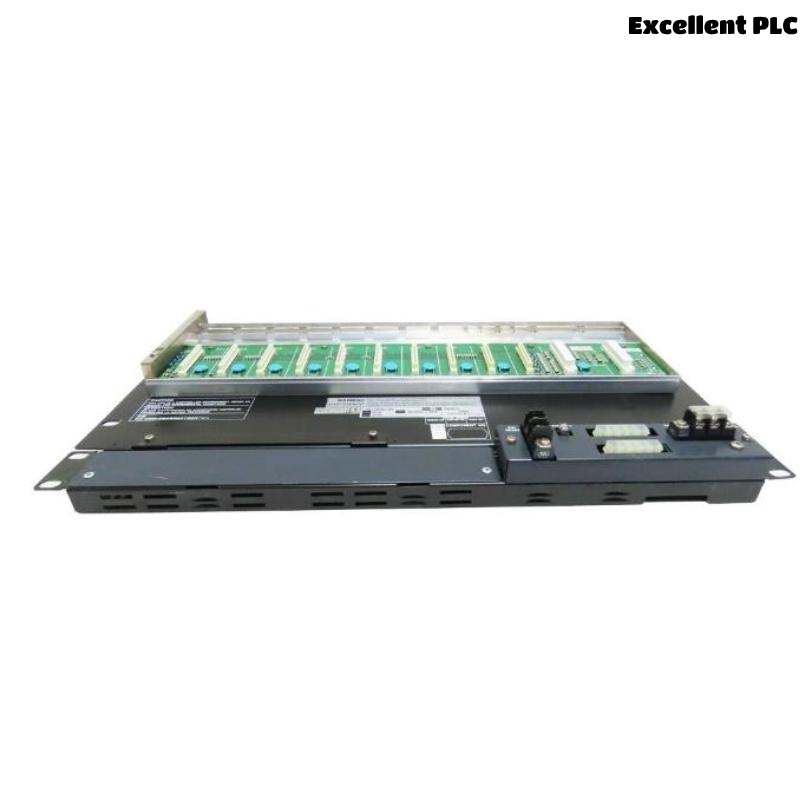
The Yokogawa AFV10D Duplexed Field Control Unit (FCU) is a 19-inch rack-mounted redundant controller for CENTUM VP Distributed Control Systems using Vnet/IP and Field Control I/O (FIO). It incorporates dual processor modules operating in active and standby modes, dual-redundant Vnet/IP communication interfaces, and redundant power supplies to provide uninterrupted process control for mission-critical industrial applications. The controller executes continuous control, sequence logic, alarm processing, and communication with FIO node units while automatically switching to the standby processor in the event of a hardware fault. Proper installation and commissioning ensure reliable operation and maximum system availability.
Contents
- 1. AFV10D Overview
- 2. Technical Features
- 3. Typical Applications
- 4. Installation Planning
- 5. Hardware Inspection
- 6. Installation Environment
- 7. Rack Mounting Procedure
- 8. Power Supply Connections
- 9. Vnet/IP and FIO Connections
- 10. Grounding Requirements
- 11. Commissioning Procedure
- 12. Functional Testing
- 13. Preventive Maintenance
- 14. Practical Installation Case
- 15. Frequently Asked Questions
AFV10D Overview
The AFV10D is a duplexed Field Control Unit designed for high-availability process control. During normal operation, the active processor executes control strategies while the standby processor continuously synchronizes memory and application data. Automatic failover occurs without interrupting plant operation if the active processor becomes unavailable. The controller supports Vnet/IP communication, redundant power supplies, battery-backed memory retention, and connection to multiple FIO node units.
Technical Features
- Duplexed processor architecture
- 19-inch rack-mounted design
- Dual-redundant Vnet/IP interfaces
- Dual-redundant power supplies
- 32 MB battery-backed main memory
- Automatic processor synchronization
- Battery memory retention up to 72 hours
- Support for multiple FIO node units
Typical Applications
- Oil and gas processing
- Petrochemical plants
- Chemical manufacturing
- Power generation facilities
- LNG terminals
- Large-scale process automation
Installation Planning
- Review engineering documentation.
- Verify rack installation location.
- Confirm redundant power availability.
- Plan Vnet/IP network topology.
- Prepare controller configuration files.
Hardware Inspection
- Verify controller model and suffix codes.
- Inspect processor modules.
- Check power supply modules.
- Inspect communication ports.
- Verify accessories before installation.
Installation Environment
- Maintain adequate cabinet ventilation.
- Avoid excessive humidity.
- Protect equipment from vibration.
- Prevent conductive dust accumulation.
- Maintain specified operating temperature.
Rack Mounting Procedure
- Disconnect all incoming power.
- Install the controller into the designated rack position.
- Secure the mounting screws.
- Install redundant power modules.
- Connect processor synchronization interfaces.
- Verify all cable connections before energizing.
Power Supply Connections
- Connect redundant power inputs.
- Verify input voltage.
- Inspect protective breakers.
- Confirm wiring integrity.
- Verify power indicators after startup.
Vnet/IP and FIO Connections
- Connect redundant Vnet/IP Ethernet cables.
- Verify network switch configuration.
- Connect FIO node units.
- Confirm communication addresses.
- Label all communication cables.
Grounding Requirements
- Connect protective earth.
- Verify rack grounding.
- Maintain low grounding resistance.
- Avoid ground loops.
- Inspect grounding continuity.
Commissioning Procedure
VERIFY INSTALLATION
CONNECT POWER
VERIFY GROUNDING
CONNECT VNET/IP
CONNECT FIO NETWORK
POWER UP BOTH PROCESSORS
VERIFY SYNCHRONIZATION
DOWNLOAD APPLICATION
VERIFY SYSTEM OPERATION
Functional Testing
- Verify active processor operation.
- Confirm standby processor synchronization.
- Test automatic failover.
- Verify Vnet/IP communication.
- Confirm FIO node communication.
Preventive Maintenance
- Inspect communication wiring regularly.
- Verify redundancy status.
- Review controller diagnostics.
- Replace backup battery according to maintenance schedules.
- Maintain controller configuration backups.
Practical Installation Case
During commissioning of a refinery control system, engineers found that the standby processor failed to synchronize after startup.
Inspection revealed that one Vnet/IP communication cable was connected to an incorrect network switch port, preventing synchronization.
After reconnecting the cable:
- Processor synchronization completed successfully.
- Automatic failover testing passed.
- All FIO node units communicated normally.
- The controller entered stable production service.
Frequently Asked Questions
Does the AFV10D support processor redundancy?
Yes. The AFV10D uses active and standby processors with automatic synchronization and failover to provide continuous process control.
How much memory does the AFV10D provide?
The controller provides 32 MB of battery-backed main memory with data retention for up to approximately 72 hours during power loss.
Which communication network does the AFV10D support?
The controller supports dual-redundant Vnet/IP communication and connects to distributed FIO node units for field I/O processing.
Summary
Proper installation of the Yokogawa AFV10D Duplexed Field Control Unit requires secure rack mounting, redundant power connections, reliable Vnet/IP networking, correct FIO wiring, effective grounding, and comprehensive commissioning. Following these procedures ensures high controller availability, dependable redundancy, and long-term process control reliability.