 Excellent PLC


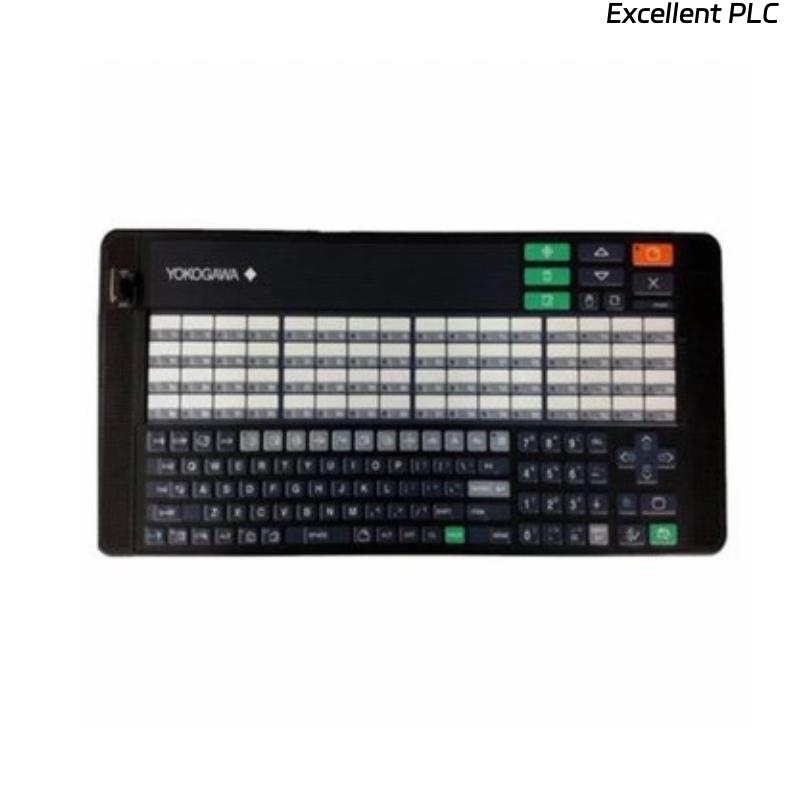
The Yokogawa AIP830 Single-Operator Keyboard is a dedicated industrial operator keyboard developed for Yokogawa CENTUM VP and CENTUM CS Human Interface Stations (HIS). Designed for single-operator console applications, the AIP830 integrates dedicated process operation keys, alarm acknowledgement buttons, display navigation controls, mode selection keys, and a numeric keypad to support efficient plant operation. Its industrial-grade construction is optimized for continuous 24/7 operation in demanding control room environments, providing faster access to critical process functions than a conventional PC keyboard.
Contents
- 1. Product Overview
- 2. Main Features
- 3. Typical Applications
- 4. Installation Preparation
- 5. Hardware Inspection
- 6. Keyboard Installation
- 7. Electrical and Communication Connection
- 8. System Configuration
- 9. Commissioning Procedure
- 10. Functional Verification
- 11. Preventive Maintenance
- 12. Practical Installation Case
- 13. Frequently Asked Questions
Product Overview
The AIP830 is the primary operator input device for a single-user CENTUM operator console. It provides dedicated control functions for process monitoring, alarm acknowledgement, graphic display selection, loop operation, and data entry. The specialized key layout improves operator efficiency while reducing the possibility of incorrect command execution during continuous industrial operation.
Main Features
- Dedicated keyboard for single-operator HIS consoles
- Industrial membrane key design
- Dedicated process function keys
- Alarm acknowledgement controls
- Display navigation keys
- Integrated numeric keypad
- Designed for continuous industrial operation
- Improves operator productivity and reliability
Typical Applications
- CENTUM VP Human Interface Stations
- CENTUM CS operator consoles
- Single-operator control stations
- Central control rooms
- Oil and gas processing facilities
- Petrochemical plants
- Power generation stations
- Chemical manufacturing plants
- Industrial automation systems
Installation Preparation
- Verify compatibility with the installed HIS software.
- Inspect the keyboard and communication cable.
- Prepare the operator workstation.
- Power down the console if required.
- Use ESD protection during installation.
Hardware Inspection
- Verify the AIP830 model number.
- Inspect the keyboard enclosure.
- Check all keys for mechanical damage.
- Inspect communication connectors.
- Verify cable condition.
Keyboard Installation
- Position the keyboard on the operator console.
- Connect the communication cable to the Human Interface Station.
- Secure all connectors.
- Arrange cables to prevent excessive bending.
- Power on the workstation.
- Verify keyboard recognition by the operating system.
Electrical and Communication Connection
- Verify connector orientation.
- Ensure secure communication cable installation.
- Inspect cable routing.
- Avoid mechanical stress on connectors.
- Confirm stable workstation power.
System Configuration
- Verify keyboard detection by the HIS.
- Confirm dedicated function key operation.
- Verify alarm acknowledgement functions.
- Check display navigation controls.
- Verify operator access permissions.
Commissioning Procedure
CONNECT THE KEYBOARD
POWER ON THE WORKSTATION
VERIFY KEYBOARD RECOGNITION
TEST FUNCTION KEYS
VERIFY ALARM ACKNOWLEDGEMENT
CHECK DISPLAY NAVIGATION
TEST NUMERIC KEYPAD
PLACE THE SYSTEM INTO SERVICE
Functional Verification
- Verify all dedicated keys operate correctly.
- Test alarm acknowledgement functions.
- Confirm display navigation.
- Verify numeric keypad operation.
- Monitor stable keyboard communication.
Preventive Maintenance
- Clean the keyboard surface regularly.
- Inspect communication cables for wear.
- Verify connector integrity.
- Protect the keyboard from moisture and dust.
- Test dedicated function keys during scheduled maintenance.
Practical Installation Case
During a control room upgrade at a natural gas processing facility, existing operator keyboards were replaced with AIP830 single-operator keyboards on multiple CENTUM VP Human Interface Stations.
Following installation and commissioning:
- Operators navigated process graphics more efficiently.
- Alarm acknowledgement became faster.
- Operator workload decreased during abnormal process conditions.
- Overall console usability improved throughout continuous plant operation.
Frequently Asked Questions
What is the AIP830 used for?
The AIP830 is a dedicated single-operator keyboard for Yokogawa CENTUM Human Interface Stations, providing specialized process operation keys for efficient plant monitoring and control.
Can a standard PC keyboard replace the AIP830?
A conventional keyboard supports standard typing but lacks the dedicated process control, alarm acknowledgement, display navigation, and function keys required for efficient CENTUM operation.
What should be verified after installation?
Verify keyboard recognition, function key operation, alarm acknowledgement, display navigation, numeric keypad functionality, and reliable communication with the Human Interface Station.
Summary
Proper installation of the Yokogawa AIP830 Single-Operator Keyboard ensures reliable interaction with CENTUM Human Interface Stations. Correct installation, configuration, and preventive maintenance improve operator efficiency, accelerate alarm response, and support safe, reliable operation of industrial process control systems.