 Excellent PLC


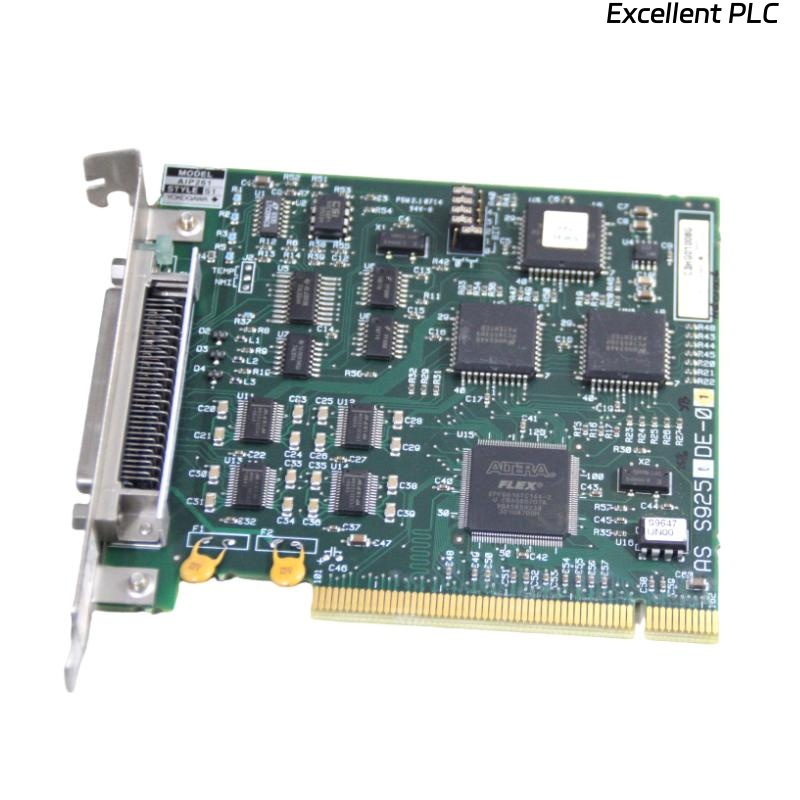
The Yokogawa AIP261 Interface Expansion Card is an industrial automation expansion module designed for Yokogawa Distributed Control Systems (DCS) and PLC-based architectures. It is used to extend system interface capacity by providing additional communication or I/O expansion capabilities depending on the controller configuration. The AIP261 integrates into the main rack or backplane system and enables scalable system design for large industrial applications such as oil and gas, petrochemical plants, power generation, and process manufacturing. Proper installation, slot configuration, wiring, grounding, and commissioning are required to ensure stable system expansion and reliable communication performance.
Contents
- 1. Product Overview
- 2. Main Features
- 3. Typical Applications
- 4. Installation Preparation
- 5. Hardware Inspection
- 6. Card Installation
- 7. Slot Configuration
- 8. Power Considerations
- 9. Communication Integration
- 10. Grounding Requirements
- 11. Commissioning Procedure
- 12. Functional Testing
- 13. Preventive Maintenance
- 14. Practical Installation Case
- 15. Frequently Asked Questions
Product Overview
The AIP261 Interface Expansion Card is used to expand the interface capacity of Yokogawa control systems. It provides additional communication channels or system interface pathways through backplane integration, allowing scalable expansion of distributed control architectures.
Main Features
- Modular interface expansion capability
- Backplane-based system integration
- High reliability industrial design
- Scalable system architecture support
- Stable communication expansion
- Compact rack-compatible design
- Continuous industrial operation
- Easy maintenance and replacement
Typical Applications
- Large-scale DCS systems
- Oil and gas processing plants
- Petrochemical industries
- Power generation systems
- Water treatment automation
- Industrial control system expansion projects
Installation Preparation
- Review system architecture documentation.
- Confirm compatible rack slot availability.
- Verify controller compatibility.
- Prepare engineering configuration files.
- Ensure system power redundancy is stable.
Hardware Inspection
- Verify AIP261 model and revision.
- Inspect PCB and connectors.
- Check backplane interface pins.
- Verify locking mechanism condition.
- Inspect for shipping damage.
Card Installation
- Disconnect system power before installation.
- Identify correct expansion slot.
- Align the card with backplane guides.
- Insert the card firmly into the slot.
- Secure locking mechanism.
- Verify physical seating and alignment.
Slot Configuration
- Assign correct slot address in system configuration.
- Verify backplane mapping settings.
- Ensure no address conflicts exist.
- Update engineering station configuration.
- Confirm system recognizes expansion card.
Power Considerations
- Verify rack power supply capacity.
- Check load distribution across modules.
- Ensure stable backplane voltage.
- Avoid overloading system bus.
- Confirm redundant power if available.
Communication Integration
- Verify interface registration in system database.
- Configure communication parameters.
- Check compatibility with controller firmware.
- Validate data exchange paths.
- Confirm system synchronization.
Grounding Requirements
- Maintain proper rack grounding.
- Ensure low resistance grounding path.
- Avoid ground loop formation.
- Verify chassis grounding continuity.
- Inspect grounding regularly.
Commissioning Procedure
VERIFY SLOT INSTALLATION
CONNECT POWER
VERIFY BACKPLANE DETECTION
CONFIGURE SLOT ADDRESS
DOWNLOAD SYSTEM CONFIGURATION
VERIFY COMMUNICATION
TEST EXPANDED INTERFACES
VALIDATE SYSTEM OPERATION
START NORMAL SERVICE
Functional Testing
- Verify module detection in engineering station.
- Confirm interface availability.
- Test communication paths.
- Validate data exchange accuracy.
- Monitor system diagnostics.
Preventive Maintenance
- Inspect slot connectors periodically.
- Check backplane integrity.
- Review system diagnostics logs.
- Maintain cabinet cleanliness.
- Update configuration backups.
Practical Installation Case
During a system upgrade in a chemical plant, an AIP261 expansion card was installed but not detected by the controller system.
Inspection revealed that the card was not fully seated in the backplane slot due to improper alignment during installation.
After reseating the card correctly:
- The system detected the module immediately.
- Interface expansion became available.
- Configuration download completed successfully.
- The control system returned to stable operation.
Frequently Asked Questions
What is the main function of the AIP261?
The AIP261 provides interface expansion capability for Yokogawa control systems through backplane integration, enabling additional communication or I/O capacity.
What happens if the card is not fully inserted?
If the card is not properly seated, the system may fail to detect it, resulting in communication or configuration errors.
What should be checked before commissioning?
Verify correct slot installation, power integrity, backplane connection, configuration settings, grounding, and system detection status.
Summary
Proper installation of the Yokogawa AIP261 Interface Expansion Card requires correct slot alignment, secure backplane connection, proper system configuration, reliable power distribution, and thorough commissioning. Following these procedures ensures stable system expansion, reliable communication integration, and long-term industrial automation performance.