 Excellent PLC


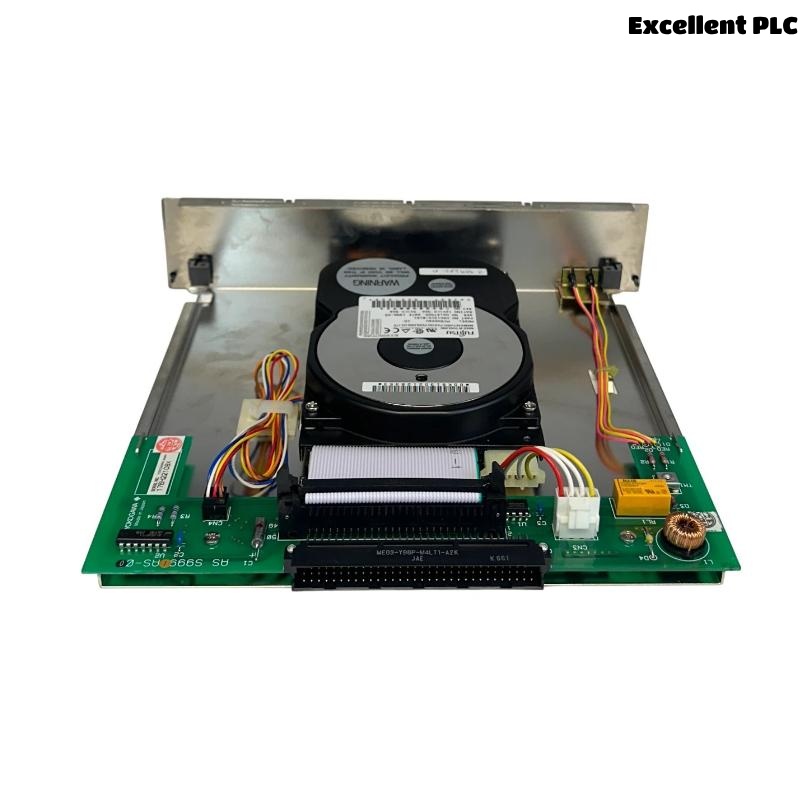
The Yokogawa AIP423 Hard Disk Module is an industrial storage device designed for use in Yokogawa Distributed Control Systems (DCS) and industrial computing platforms. It provides reliable non-volatile storage for operating systems, engineering databases, historical process data, alarm records, configuration files, application software, and system backups. Engineered for continuous operation in demanding industrial environments, the AIP423 offers high reliability, stable data retention, and compatibility with Yokogawa automation systems. Proper installation, handling, configuration, and commissioning are essential to ensure data integrity, dependable system performance, and long service life.
Contents
- 1. Product Overview
- 2. Main Features
- 3. Typical Applications
- 4. Installation Preparation
- 5. Hardware Inspection
- 6. Hard Disk Module Installation
- 7. Storage Configuration
- 8. Power and System Connections
- 9. Commissioning Procedure
- 10. Functional Testing
- 11. Preventive Maintenance
- 12. Data Backup Recommendations
- 13. Practical Installation Case
- 14. Frequently Asked Questions
Product Overview
The AIP423 Hard Disk Module provides secure industrial data storage for Yokogawa automation systems. It stores operating system files, engineering projects, historical databases, process trends, alarm logs, and configuration information required for continuous plant operation and maintenance.
Main Features
- Industrial-grade storage device
- Reliable long-term data retention
- High operational stability
- Continuous industrial operation
- Support for engineering databases
- Fast data access performance
- Compact modular construction
- Designed for DCS applications
Typical Applications
- Yokogawa engineering workstations
- Operator stations
- Historical data servers
- Industrial control computers
- Process automation systems
- Plant information management systems
Installation Preparation
- Back up all existing data before replacement.
- Verify hardware compatibility.
- Review installation procedures.
- Prepare anti-static protection.
- Shut down the host system safely.
Hardware Inspection
- Verify module model number.
- Inspect the drive housing.
- Check interface connectors.
- Inspect mounting hardware.
- Verify packaging for shipping damage.
Hard Disk Module Installation
- Disconnect system power.
- Observe electrostatic discharge precautions.
- Install the hard disk module in the designated drive bay.
- Secure all mounting screws.
- Connect interface and power connectors securely.
- Verify mechanical stability.
Storage Configuration
- Verify BIOS or system recognition.
- Configure storage parameters if required.
- Restore operating system or engineering software.
- Verify partition integrity.
- Confirm data accessibility.
Power and System Connections
- Verify stable power supply.
- Inspect interface cable connections.
- Confirm proper connector engagement.
- Check power indicators.
- Verify system startup.
Commissioning Procedure
VERIFY INSTALLATION
CONNECT POWER
VERIFY DRIVE DETECTION
LOAD SYSTEM SOFTWARE
RESTORE CONFIGURATION
VERIFY DATA ACCESS
TEST SYSTEM FUNCTIONS
START NORMAL OPERATION
Functional Testing
- Verify successful system boot.
- Confirm hard disk recognition.
- Test read and write operations.
- Verify database accessibility.
- Review system diagnostics.
Preventive Maintenance
- Perform regular system backups.
- Monitor storage health.
- Inspect cooling airflow.
- Review diagnostic logs.
- Replace aging storage devices during scheduled maintenance.
Data Backup Recommendations
- Create scheduled engineering database backups.
- Back up configuration files before updates.
- Store backups on independent media.
- Verify backup integrity regularly.
- Maintain disaster recovery procedures.
Practical Installation Case
During replacement of an engineering workstation storage device, the new AIP423 module was installed successfully, but the operating system failed to boot.
Inspection showed that the boot configuration had not been restored after replacing the storage module.
After restoring the system image and engineering database:
- The workstation booted successfully.
- Engineering software operated normally.
- Historical process data became available.
- Plant maintenance activities resumed without interruption.
Frequently Asked Questions
What is the primary function of the AIP423?
The AIP423 provides reliable industrial storage for operating systems, engineering databases, configuration files, historical process data, and application software used in Yokogawa automation systems.
Why should data be backed up before replacement?
Replacing a storage module without a verified backup may result in permanent loss of engineering projects, historical records, alarm logs, and system configuration files.
What should be verified after installation?
Verify drive recognition, operating system startup, database accessibility, application functionality, and overall system stability before returning the system to service.
Summary
Proper installation of the Yokogawa AIP423 Hard Disk Module includes careful electrostatic handling, secure mechanical installation, reliable interface connections, correct storage configuration, complete data restoration, and comprehensive functional testing. Following these procedures helps ensure dependable data storage, reliable system operation, and long-term industrial automation performance.