 Excellent PLC


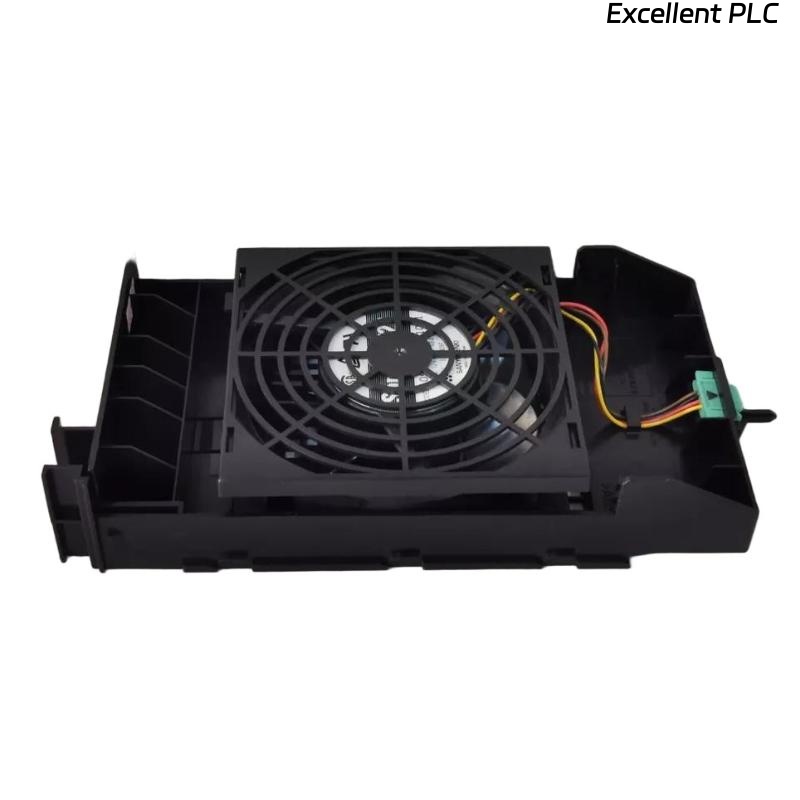
The Yokogawa AIP601 Fan Unit is a forced-air cooling module designed for Yokogawa CENTUM VP and CENTUM CS Distributed Control Systems (DCS). It provides continuous airflow for Field Control Units (FCUs), I/O Expansion Cabinets, communication modules, power supplies, and other cabinet-mounted equipment. Proper fan operation is critical to maintaining acceptable internal cabinet temperatures and ensuring long-term reliability of electronic components. Failure of the AIP601 may result in elevated cabinet temperatures, controller thermal alarms, communication instability, or premature hardware failure. A systematic troubleshooting procedure helps maintenance engineers quickly identify cooling problems and restore proper cabinet ventilation.
Contents
- 1. Understanding Fan Unit Failures
- 2. Common Failure Symptoms
- 3. Typical Causes of Cooling Problems
- 4. Initial Hardware Inspection
- 5. Power Supply Verification
- 6. Airflow and Mechanical Inspection
- 7. Diagnostic Analysis
- 8. Recommended Troubleshooting Workflow
- 9. Corrective Actions
- 10. Cooling Recovery Verification
- 11. Preventive Maintenance
- 12. Real Industrial Maintenance Case
- 13. Frequently Asked Questions
Understanding Fan Unit Failures
The AIP601 continuously circulates air inside Yokogawa control cabinets to dissipate heat generated by processors, power supplies, communication modules, and I/O assemblies. Most cooling failures are caused by worn fan bearings, dust accumulation, blocked ventilation paths, loose power connections, or normal fan aging rather than failures elsewhere in the control system.
Common Failure Symptoms
- Cabinet temperature alarms are generated.
- The fan does not rotate after power-up.
- Abnormal noise or vibration from the fan.
- Reduced airflow inside the cabinet.
- Controller temperature gradually increases.
- Unexpected controller shutdown caused by overheating.
- Intermittent fan operation.
- Visible dust accumulation restricting airflow.
Typical Causes of Cooling Problems
- Fan bearing wear.
- Accumulated dust on fan blades.
- Blocked cabinet ventilation openings.
- Loose fan power connector.
- Power supply abnormalities.
- Mechanical damage to fan blades.
- High ambient cabinet temperature.
- Internal AIP601 motor failure.
Initial Hardware Inspection
- Verify the fan is securely mounted.
- Inspect the fan blades for damage.
- Check the power connector.
- Inspect ventilation openings for obstruction.
- Look for excessive dust inside the cabinet.
Power Supply Verification
- Measure the fan supply voltage.
- Verify cabinet power distribution.
- Inspect power connectors for loose contacts.
- Review controller environmental diagnostics.
- Correct power abnormalities before replacing the fan.
Airflow and Mechanical Inspection
- Verify the fan rotates freely by hand when powered off.
- Inspect bearings for excessive resistance or noise.
- Clean accumulated dust from the fan blades.
- Ensure airflow direction is correct.
- Inspect cabinet air filters and replace if necessary.
Diagnostic Analysis
| Observed Condition | Possible Diagnosis |
|---|---|
| Fan not rotating | Power loss, loose connector, or failed motor |
| Abnormal noise | Worn bearings or damaged fan blades |
| Weak airflow | Dust buildup, blocked filter, or reduced fan speed |
| Cabinet overheating | Cooling failure or restricted ventilation |
| Intermittent operation | Loose electrical connection or failing motor |
Recommended Troubleshooting Workflow
VERIFY POWER SUPPLY
CHECK FAN OPERATION
INSPECT FAN CONNECTORS
CLEAN FAN AND AIR FILTERS
VERIFY AIRFLOW
CHECK CABINET TEMPERATURE
REVIEW DIAGNOSTIC ALARMS
REPLACE FAN IF NECESSARY
VERIFY NORMAL COOLING
MONITOR LONG-TERM OPERATION
Corrective Actions
- Reconnect loose electrical connectors.
- Clean the fan blades and ventilation openings.
- Replace clogged cabinet air filters.
- Remove airflow obstructions.
- Replace worn or damaged fan assemblies.
- Restore stable cabinet power supplies.
- Replace the AIP601 if the motor has failed.
Cooling Recovery Verification
- Verify continuous fan rotation.
- Confirm stable airflow throughout the cabinet.
- Monitor controller temperature.
- Verify cabinet alarms have cleared.
- Confirm normal long-term cooling performance.
Preventive Maintenance
- Clean fan blades during scheduled maintenance.
- Inspect cabinet air filters regularly.
- Remove dust from ventilation openings.
- Listen for early bearing noise.
- Replace fans before reaching end-of-life service hours.
- Maintain recommended cabinet ambient temperature.
Real Industrial Maintenance Case
During routine maintenance at a combined-cycle power plant, operators observed recurring cabinet high-temperature alarms affecting a CENTUM VP Field Control Unit.
Inspection revealed that the AIP601 fan blades were heavily coated with dust and the bearings produced excessive mechanical noise, significantly reducing airflow.
After replacing the fan unit and cleaning the cabinet ventilation system:
- Cabinet temperature returned to its normal operating range.
- Controller thermal alarms were eliminated.
- Airflow increased significantly.
- The control system continued stable operation without additional overheating events.
Frequently Asked Questions
Why is the cabinet temperature increasing?
The most common causes are fan failure, blocked ventilation openings, clogged air filters, excessive dust accumulation, or unusually high ambient temperatures.
Can dust cause fan failure?
Yes. Dust accumulation reduces airflow, increases motor load, accelerates bearing wear, and can eventually cause complete cooling failure.
When should the AIP601 be replaced?
The fan unit should be replaced when abnormal bearing noise, excessive vibration, intermittent operation, reduced airflow, or motor failure is confirmed after verifying the power supply and connector integrity.
Summary
Effective troubleshooting of the Yokogawa AIP601 Fan Unit requires systematic inspection of power supplies, fan operation, airflow, cabinet ventilation, and environmental conditions. Regular cleaning, preventive maintenance, and timely replacement of aging fan units help prevent overheating, extend equipment life, and ensure reliable operation of Yokogawa CENTUM VP and CENTUM CS Distributed Control Systems.