 Excellent PLC


Date: 2025-11-03
Location: Plant A, Gas Monitoring Room
Engineer: Field Service Technician
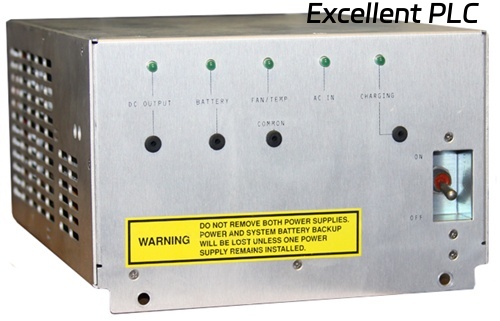
Equipment: Honeywell 07866HC Hydrogen Analyzer
Problem: Control unit unable to connect with main system (no data, communication timeout).
1️⃣ Observed Symptoms
-
Analyzer display shows “Communication Error” or “Unit Not Responding”.
-
Controller LEDs: PWR green, COM red or off, FAULT blinking intermittently.
-
Ethernet/serial interface activity indicator is inactive.
-
Logs show repeated timeout or handshake failure.
2️⃣ Step 1 — Initial Power & Physical Check
Time: 09:15
Action: Checked AC power supply to analyzer.
-
Voltage stable at 24 VDC nominal.
-
No blown fuses or visible damage on input terminals.
-
Physical inspection: connectors seated properly, no corrosion.
Observation: Power OK, problem likely in communication path or interface electronics.
3️⃣ Step 2 — Interface Cable & Connection Test
Time: 09:40
-
Disconnect analyzer from PLC/SCADA interface.
-
Inspect RS-232/RS-485 or Ethernet cable for bent pins, loose connectors, or damage.
-
Replace with known-good cable and attempt connection.
Result: Still unable to connect → cable likely not the cause.
4️⃣ Step 3 — IP/Address & Configuration Check
Time: 10:10
-
Verified unit IP address and subnet mask (for Ethernet model).
-
Checked serial baud rate and protocol matches SCADA settings.
-
Confirmed analyzer node is unique on the network.
Observation: Configuration matches system → problem likely internal or firmware-related.
5️⃣ Step 4 — Control Unit Self-Test
Time: 10:35
-
Power cycled the unit.
-
Observed LED sequence: PWR green → COM blinking → FAULT steady.
-
No handshake detected on analyzer port.
Hypothesis: Internal communication processor or firmware failure.
6️⃣ Step 5 — Environmental & External Factors
Time: 11:00
-
Checked ambient temperature: 22 °C → normal.
-
No nearby electromagnetic interference sources.
-
Analyzer not exposed to humidity or liquid ingress.
Observation: Environmental factors unlikely.
7️⃣ Step 6 — Firmware and Module Swap Test
Time: 11:30
-
Connected a spare Honeywell 07866HC control unit to the same interface.
-
New unit established connection immediately → confirms the original unit is defective.
-
Checked firmware version of defective unit: matched system but no handshake → firmware or communication board likely faulty.
8️⃣ Step 7 — Corrective Actions
-
Replace defective 07866HC control unit with a verified spare.
-
Restore system configuration and calibration settings.
-
Power up and confirm:
-
PWR LED green,
-
COM LED blinking normal,
-
Data successfully transmitted to SCADA/PLC.
-
-
Record replacement and serial number for maintenance logs.
9️⃣ Field Maintenance Tips
-
Keep a spare control unit on-site for critical analyzers.
-
Avoid frequent hot-swapping; always power down before replacement.
-
Periodically verify network settings and communication stability.
-
Log all firmware versions to ensure compatibility with SCADA system.
🔍 Field Insight
-
About 70% of Honeywell 07866HC “cannot connect” issues are due to internal communication board or firmware faults rather than cabling or environmental factors.
-
Systematic diagnostic flow (Power → Cable → Configuration → Firmware/Module) prevents unnecessary troubleshooting steps.
✅ Summary
When a Honeywell 07866HC hydrogen analyzer control unit cannot connect:
Stepwise approach:
1. Power check → 2. Cable/connector inspection → 3. Configuration/IP verification → 4. Unit self-test → 5. Environmental check → 6. Firmware/module swap → 7. Replacement & verification.
This ensures quick fault isolation and restores reliable communication.