 Excellent PLC


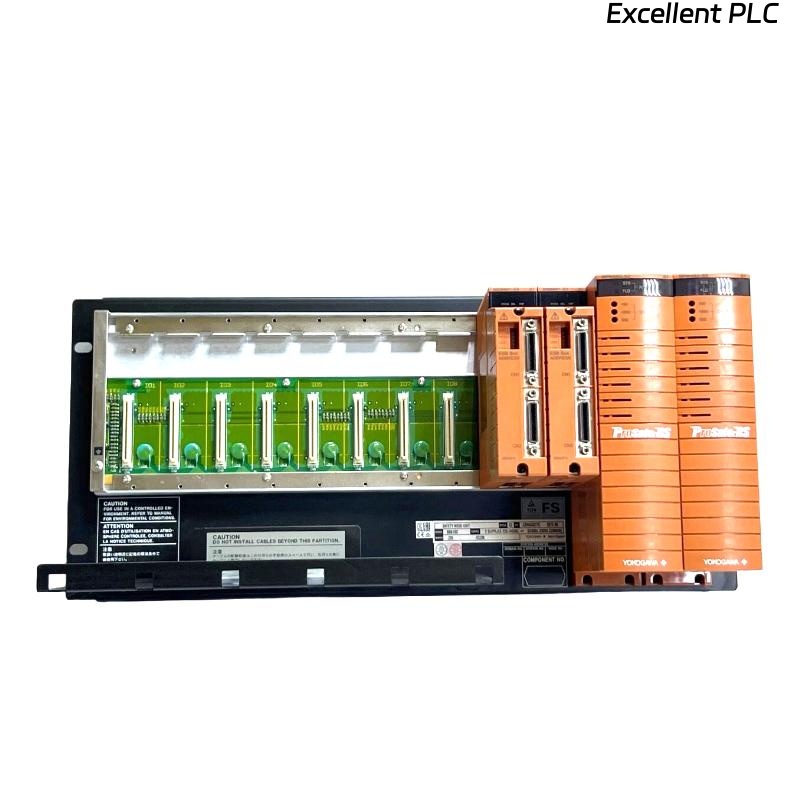
Yokogawa SNB10D-415/CU2N installation issues are frequently caused by ESB Bus configuration mistakes, redundant power wiring errors, or improper Safety Node Unit allocation rather than hardware defects. A structured Installation Guide and Commissioning strategy can significantly reduce startup delays in ProSafe-RS Safety Instrumented Systems.
Contents
- SNB10D-415/CU2N Safety Node Unit Overview
- Role of the SNB10D-415/CU2N in Safety Systems
- Engineering Planning Before Installation
- 220VAC Power Design Requirements
- Installation Environment Assessment
- Control Cabinet Preparation
- Equipment Inspection Checklist
- SNB10D-415/CU2N Installation Guide
- ESB Bus Network Setup
- Safety I/O Allocation Strategy
- Grounding and Shielding Practices
- Initial Startup Verification
- SNB10D-415/CU2N Setup Procedure
- System Configuration Validation
- Commissioning Workflow
- Functional Verification Tests
- Redundancy Validation
- Performance Optimization
- Real Commissioning Case
- FAQ
SNB10D-415/CU2N Safety Node Unit Overview
The Yokogawa SNB10D-415/CU2N Safety Node Unit is designed for ProSafe-RS Safety Instrumented Systems. It exchanges process safety data through the ESB Bus and supplies power to installed safety I/O modules. The model supports redundant 220VAC power architecture and high-availability communication for critical process applications.
Role of the SNB10D-415/CU2N in Safety Systems
- Safety signal collection
- Emergency shutdown integration
- Fire and gas monitoring
- Distributed I/O communication
- Safety loop management
Engineering Planning Before Installation
Successful Setup begins long before the hardware is mounted.
- Review system architecture
- Verify node quantity calculations
- Confirm communication topology
- Plan maintenance access
- Allocate safety functions
220VAC Power Design Requirements
- Independent feeder circuits
- Dual power redundancy
- Circuit breaker coordination
- Voltage stability verification
- Ground fault protection
Field experience shows that unstable power quality can create communication alarms during Commissioning.
Installation Environment Assessment
- Ambient temperature control
- Low vibration area
- Dust-controlled enclosure
- Humidity monitoring
- EMC-compliant environment
Control Cabinet Preparation
- Rack space verification
- Cable routing channels
- Ground bar installation
- Cooling airflow assessment
Equipment Inspection Checklist
- Verify model number
- Inspect CU2N interface
- Check shipping damage
- Review project documentation
- Inspect mounting accessories
SNB10D-415/CU2N Installation Guide
- Disconnect incoming power.
- Prepare rack location.
- Position the Safety Node Unit.
- Secure mounting screws.
- Verify alignment.
- Inspect installation quality.
ESB Bus Network Setup
- Verify communication routes
- Check node addressing
- Inspect ESB connections
- Confirm redundancy paths
- Validate communication topology
Safety I/O Allocation Strategy
- Digital input grouping
- Digital output assignment
- Analog signal mapping
- Voting logic distribution
- Shutdown loop segregation
Grounding and Shielding Practices
- Protective earth verification
- Cable shield continuity
- Cabinet bonding inspection
- Ground loop prevention
Initial Startup Verification
- Power LED inspection
- Communication health review
- Node recognition confirmation
- Alarm monitoring
SNB10D-415/CU2N Setup Procedure
APPLY POWER
VERIFY NODE STATUS
CHECK ESB COMMUNICATION
CONFIRM I/O DETECTION
VALIDATE PARAMETERS
SAVE CONFIGURATION
System Configuration Validation
- Address verification
- I/O mapping review
- Communication parameter validation
- Redundancy setting inspection
- Safety logic confirmation
Commissioning Workflow
Experienced engineers validate infrastructure before testing process safety functions.
- Hardware verification.
- Communication validation.
- Power redundancy testing.
- Signal simulation.
- Integrated safety testing.
Functional Verification Tests
- Digital input simulation
- Output activation testing
- Alarm verification
- Trip logic validation
- Recovery testing
Redundancy Validation
- Power failover testing
- Communication switchover verification
- Node recovery checks
- Alarm generation testing
Performance Optimization
- Communication trend monitoring
- Configuration backup strategy
- Periodic redundancy testing
- Network latency tracking
Real Commissioning Case
During a refinery SIS upgrade project, an SNB10D-415/CU2N generated repeated communication alarms immediately after startup.
Measured values included:
- Power input: 221VAC
- Communication latency: 154 ms
- Node status: Active
- I/O visibility: Partial
The maintenance team initially suspected a communication hardware fault.
Further investigation revealed that the redundant ESB communication path was incorrectly routed through a maintenance panel.
After correcting the communication path:
- Latency reduced to 8 ms
- Communication stabilized
- All I/O modules became available
- Commissioning completed successfully
We observed that communication design mistakes often mimic hardware failure during startup activities.
SNB10D-415/CU2N Installation Guide FAQ
What is the primary purpose of the SNB10D-415/CU2N?
The unit acts as a Safety Node Unit that exchanges safety process information between distributed I/O modules and the Safety Control Unit.
Why should ESB Bus topology be validated before startup?
Communication routing errors are among the most common causes of Commissioning delays.
Is redundancy testing necessary before process startup?
Yes. Both power and communication redundancy should be verified before the SIS enters service.
Summary: Successful SNB10D-415/CU2N Installation, Setup, and Commissioning require proper ESB Bus design, reliable 220VAC power architecture, accurate System Configuration, and comprehensive redundancy testing.